Want to try VR on your Android phone without spending much? The best VR apps for Android are simple Cardboard-style picks: YouTube 360-degree videos, Lanterns and Cosmic Rollercoaster, all free.
This guide is part of our wider coverage of smartphone virtual reality, focused on apps you can run in a simple phone headset.
| Item | Value |
|---|---|
| Cardboard headset price | Around $20 |
| Cardboard introduced | June 2014 |
| Roller Coaster VR Play Store downloads | 1-5 million |
| Labyrinth VR price | $0.99 |
| Stereogram images found for “San Francisco” | 475 images |
These figures come from GamesBeat’s 2015 roundup and Android Central’s Cardboard list. Prices and download counts can change, so check the source and the Google Play listing before you rely on them.
What you need before you install a VR app
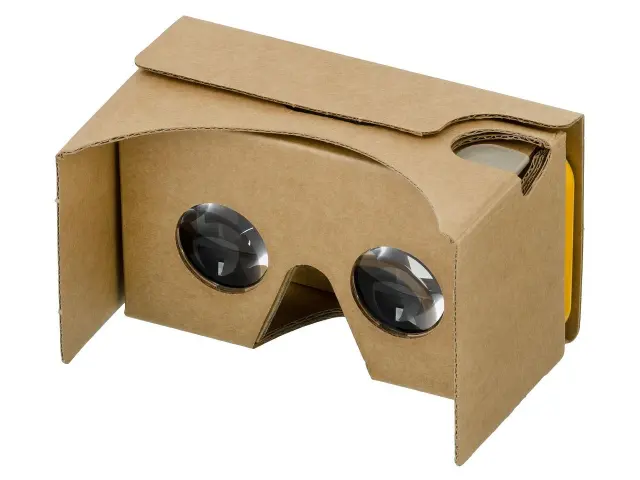
Most of the apps below were built for a Cardboard-style viewer, a cheap holder with lenses that turns your phone into a headset. GamesBeat said you could order one for around $20 or build your own, and noted that Cardboard was introduced at Google’s I/O developer conference in June 2014.
If you have never held a viewer, our walkthrough on how to use google cardboard covers the setup in plain steps.
The roundups behind this guide are several years old, so some apps may have been renamed, changed or removed. Treat each name below as a search term on Google Play, then read the latest listing and reviews before you install.
A few quick checks save frustration:
- Does the app need a separate game controller? The third-person game Hardcode, in one of the sources, did.
- Is it free, or does it ask for in-app purchases?
- Does your phone meet the app’s requirements? An early Expert Reviews guide warned that you need a compatible smartphone for the headset.
Best video and 360-degree apps
Video is the easiest way in, because you only need to look around. The YouTube app is free, and GamesBeat explained the method: search for #360video, open a clip, then tap the Cardboard icon that appears in the bottom right corner.
ARTE 360 VR is a free video app that lets you travel to places such as coral reefs and mountain landscapes, according to Christian Today’s list. The same list described Vrse as a collection of short films with binaural sound, so wear headphones.
Google’s own Cardboard app is also worth opening. Expert Reviews picked its animated Windy Day as a favourite, and pointed to Google’s Chrome experiments page for Cardboard as a good place for music visuals, a basic game and real-world video.
Games and rides that use head movement
Games in a phone headset work best when they need only your head, not buttons. Roller Coaster VR was the pick GamesBeat called a must for a first Cardboard experience, and it had 1-5 million Play Store downloads as of that 2015 roundup.
Other head-controlled options from the sources:
- Cosmic Rollercoaster sends you on a trip through space and is free, according to Android Central.
- Labyrinth VR is a maze game where you steer by turning left and right, and Android Central listed it at $0.99.
- Proton Pulse is a three-dimensional brick breaker with 50 levels that Christian Today listed at US$2.00.
- Corridoom VR has you dodge walls in a dark tunnel by turning your head, per GamesBeat.
- Protect the Planet is an asteroid-style shooter you aim with your head, which Expert Reviews said takes a toll on your neck.
Not every game fits this style. Android Central warned that some Cardboard games require full controllers and others do not work as advertised, so skim reviews first.
Calm and exploring apps
If rides feel like too much, slower apps are a gentler start. Lanterns is a basic, free experience of a lantern festival, with flickering lights moving along a river, according to Christian Today.
Relaxation VR from the same list lets you visit places such as the 12 Apostles in Australia, with an optional guided Yoga Nidra meditation or relaxing music.
Expert Reviews described Tuscany Drive as a small world you walk through by looking at your feet to start or stop. For something different, GamesBeat’s reviewer used Stereogram to browse historical stereoscopic images and found 475 images when searching for “San Francisco”.
How to choose without feeling unwell
Fast motion is the main reason people feel queasy. Expert Reviews said one simple rollercoaster app had a compelling sense of speed that was enough to confuse both stomach and inner ear.
Our guide to vr motion sickness explains why this happens and what helps.
A sensible order to try things:
- Start with a calm app such as Lanterns or a 360-degree video.
- Move to a walking or maze app that gives you control over movement.
- Try coasters last, and stop as soon as you feel off.
Frequently asked questions
Which app should I try first?
Show answer
GamesBeat called Roller Coaster VR the app that “has got to be your first Cardboard experience” in its 2015 roundup. If you would rather start gently, try Lanterns or a YouTube 360-degree video.
Do I need a controller?
Show answer
Most picks here only need head movement. Christian Today noted that Hardcode needed a game controller, and Android Central warned that some games require full controllers.
Are these apps free?
Show answer
Several are: YouTube, ARTE 360 VR, Lanterns and Cosmic Rollercoaster were listed as free. Labyrinth VR was listed at $0.99 and Proton Pulse at US$2.00, and Hardcode may need in-app purchases.
Will every app work on my phone?
Show answer
Not necessarily. Early Expert Reviews coverage said you need a compatible phone, and the sources date from 2014 to 2021, so read the Play Store listing for current requirements.